The tank stays almost empty or fills less than it used to. Does that mean the appliance is faulty? Before contacting after-sales support, a few observations can help you describe the problem accurately without opening the appliance or running repeated tests. The aim is to distinguish low water collection, a shutdown and a fault that means you must stop using the dehumidifier, rather than repair it yourself.
Start by describing what has changed
‘It collects little water’ can mean several things. Has the appliance just been installed and never collected more? Did it previously work in the same room? Does the tank stay empty while the controls seem active, or does the appliance stop before you next check it? These differences help after-sales support.
Note the date of first use, when you noticed the change and what happened between those dates: moving the appliance, emptying the tank, selecting a timer or changing how you use the room. A factual timeline is more helpful than a conclusion such as ‘the motor is broken’, which cannot be established from the water level.
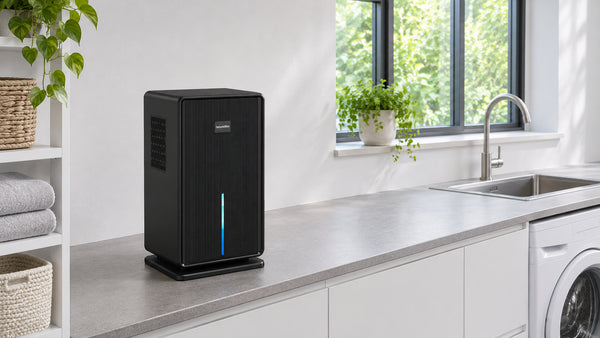
The white Oléa Néris Max, EU plug variant, is a concrete example here. Its product page lists a removable tank, a timer and automatic shut-off when the tank is full. These features are points to check separately. They do not prove that low water collection is necessarily normal.
Four accessible checks without dismantling
1. Distinguish elapsed time from operating time
An appliance plugged in in the morning and checked in the evening has not necessarily run throughout that period. Record when it was switched on, the timer setting and its state when you returned. If you do not know when it stopped, simply say so.
The timer on Néris Max makes this check particularly relevant. Also note the selected mode. Do not infer an expected quantity of water from the name of a mode. Observing the controls is not a performance test.
2. Observe the tank indicator before handling it
Photograph the indicator and note whether it stays on or flashes. The YP2118 manual linked from the product page associates the red tank indicator with a full tank or one that is not installed. A tank signal may therefore call for a different check from low water collection during operation.
To check the tank, switch off and unplug the appliance with dry hands. Follow the manual to remove the tank, empty it if necessary and refit it correctly without forcing it. Never block its detection mechanism. If the signal persists after this check, describe it to support rather than trying to bypass the safety feature.
3. Look at the outside without working inside
With the appliance off, visually inspect the accessible openings. Is a textile, packaging or an object covering them? Photograph the situation before moving anything in the way. Do not insert objects into a grille or remove the casing to look for a blockage.
This observation does not authorise improvised cleaning. If the openings look dirty, check the maintenance procedure for the model or ask support for it. Spraying products into the appliance or removing parts not intended for routine maintenance is not a step in this checklist.
4. Note the conditions without inventing an expected result
The Néris Max product page states that water collection depends on room temperature and humidity. If you have a thermometer and hygrometer, note their readings and the time, using them according to their instructions. Otherwise, write ‘not measured’ rather than estimating a level.
Also mention any change of room or use. These details give support context. They do not by themselves establish that the appliance is working correctly or is faulty. For the difference between tank volume and advertised performance, see our guide tank capacity or daily extraction.
When to stop checking
The manual says to stop using the appliance after immersion or damage affecting its operation, and to have a professional repair it rather than dismantling it. Low water collection never justifies continuing to test a damaged appliance.
If the appliance is leaking, smells of burning, emits smoke or has a damaged cable, do not switch it on again to film the symptom. Keep away from dangerous equipment and seek guidance on making it safe. Measuring collected water is no longer the priority.
Two situations to help you choose the next step
These situations illustrate a way of reasoning. They are not tests carried out on Néris Max.
There is little water in the tank and the appliance has stopped
Before comparing water levels, record the controls and indicators. A selected timer and a tank signal convey different things. If no known setting explains the shutdown, send your observations to support without declaring the cause yourself.
The appliance seems to run, but water collection has changed
Describe the difference from the previous period and any change in conditions. Avoid moving the appliance, changing the mode and altering several habits at once. You would no longer know which observation related to which situation. Ask support for the appropriate checking procedure for the model rather than inventing a test duration or a minimum quantity of water.
Prepare a support message that helps move things forward
Gather the information available in one message. You do not need every measurement to report a problem.
- Exact model and variant, with the order number.
- When the problem started and previous operation, if known.
- Observed switch-on and shutdown times, selected mode and timer.
- Indicator state, visible water level in the tank and what happened after refitting it.
- Measured temperature and humidity, or an explicit note that these were not measured.
- Clear photographs of the controls, external setup and model label, without unnecessary personal documents.
Finish with a concrete question: ‘Which check specified for this model should I carry out, and should I leave the appliance off while waiting for your reply?’ Do not promise to take it apart or buy a part based on a guess.
Frequently asked questions
Should I wait for the tank to fill before contacting support?
No. You can report water collection that seems unusual using the facts already available. A full tank is not a condition for contacting support, particularly when there is an unexplained shutdown or a persistent indicator.
Do I have to buy a hygrometer to get help?
A measurement can add detail to your description, but you can start by sending the observations you have. Do not invent a reading. Support can tell you what additional information is needed.
Can I add water to the appliance to see whether it works?
No. This guide includes no such test. Do not pour water into the body of the appliance or try to trigger a full-tank signal. Ask support for a procedure if the accessible checks are not enough.
Observe before drawing conclusions
A useful report distinguishes what you saw from what you suspect. Describe the times, settings, indicators and conditions you know, then ask support to confirm the next step. This helps you avoid unnecessary handling while giving support the information it needs to guide its response.